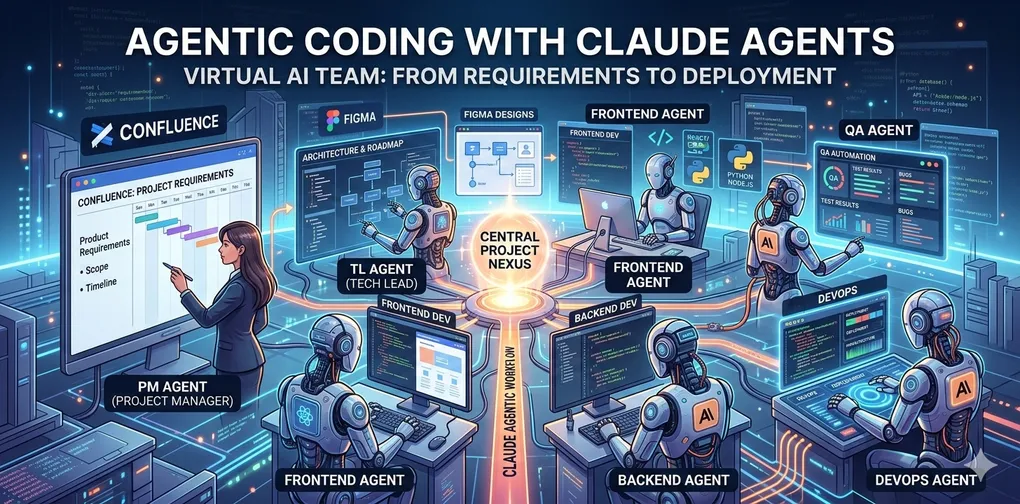
Agentic coding using claude code agents
Complete Guide to Running a Multi-Agent Software Development Workflow
Table of Contents
- Overview
- Architecture
- Prerequisites
- Project Setup
- Agent Definitions
- Workflow Execution
- MCP Server Integration
- QA Cycle and Bug Tracking
- Memory and Context Management
- The Verdict: Humans vs. Agents
1. Overview
In traditional software development, the path from a vision to a live application is a relay race. A Project Manager captures the “what,” a Team Lead defines the “how,” developers write the code, and QA ensures it doesn’t break—all while DevOps keeps the engine running. But what if the relay baton wasn’t passed between people, but between autonomous AI agents?
This blog explores a “wild thought” turned reality: replacing the entire software development lifecycle (SDLC) hierarchy with a multi-agent system powered by Claude.
The Experiment: From Figma to Final Sign-off To test the limits of agentic coding, built an Employee Maintenance Application without a single human “line-worker.” Instead, humans acted as the Architect-Orchestrator, setting the rules of engagement while the agents handled the toil.
The workflow followed a high-fidelity path:
The Blueprint: Wireframes were designed in Figma, serving as the visual source of truth.
The Brain: Requirements were documented in Confluence, providing the functional guardrails.
The Orchestrator: Introduced a central Project Manager (PM) Agent. Using a CLAUDE.md “Project Constitution,” this agent didn’t just write code snippets; it managed the team.
I recognize that agentic workflows are an exploding field and I’m certainly not the first to experiment with AI-driven development. However, seeing a full squad of Claude agents move a project from a Figma wireframe to a deployed app was an eye-opening experience that I felt compelled to share with you all.
What Was Built
An Employee Maintenance Application with:
- Backend REST API (Node.js + Express) with full CRUD operations
- Frontend SPA (React 18 + Tailwind CSS) with list, create, edit, delete, and search
- JSON file-based data persistence (no database for MVP)
- Soft-delete pattern, inline form validation, pagination, real-time search
Agents Involved
| Agent | Role | Runs As |
|---|---|---|
| Project Manager | Orchestrator — reads requirements, creates Jira tickets, delegates, tracks QA | Main conversation (CLAUDE.md) |
| Team Lead | Writes Technical Design Document to Confluence | Sub-agent (general-purpose) |
| Backend Developer | Implements Node.js/Express API | Sub-agent (general-purpose) |
| Frontend Developer | Implements React + Tailwind SPA | Sub-agent (general-purpose) |
| QA Engineer | Reviews code, logs Jira defects, verifies fixes | Sub-agent (general-purpose) |
2. Architecture
Agent Orchestration Flow
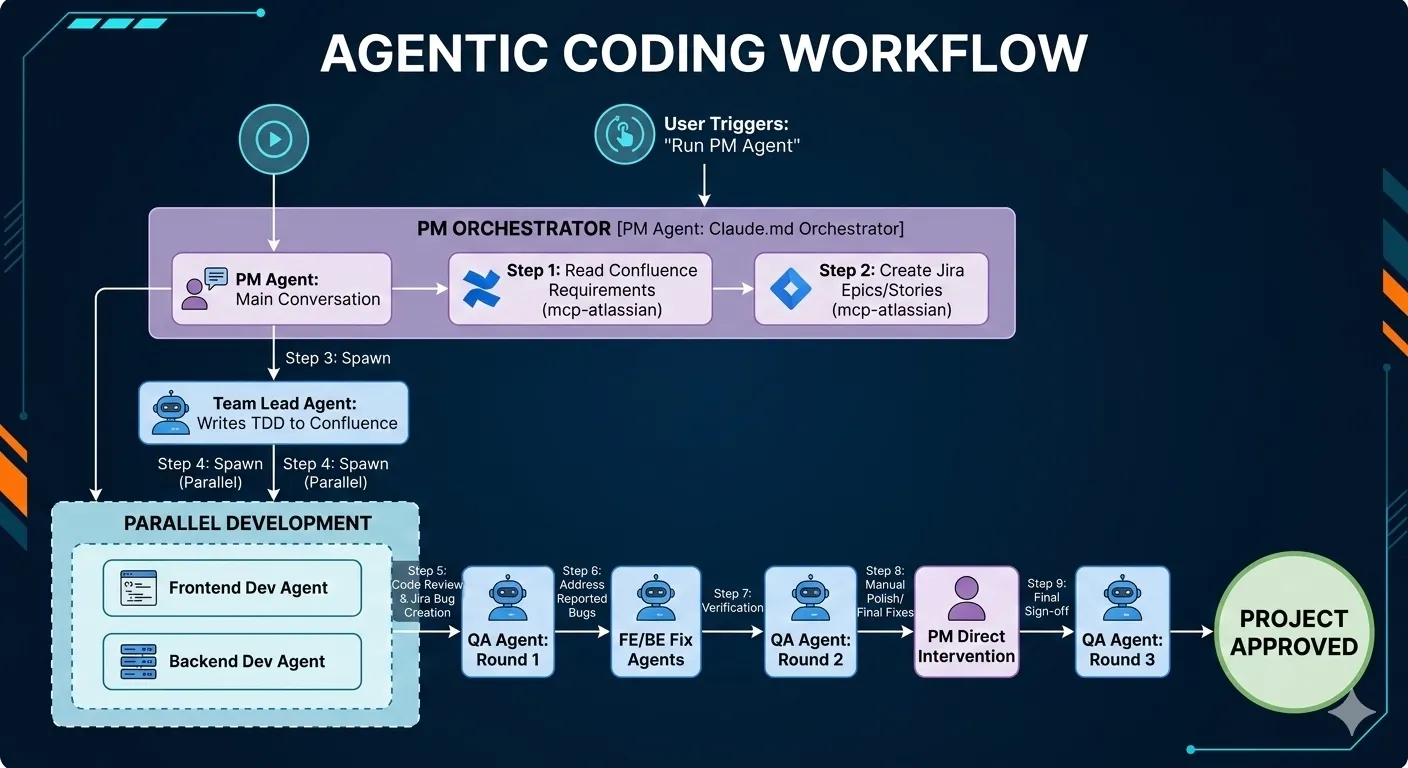
Communication Pattern
- PM → Sub-agents: Detailed prompts with full context (requirements, file paths, API contracts, Jira ticket references)
- Sub-agents → PM: Structured results (created file list, QA report JSON, bug details)
- All agents → Jira: Create/transition issues via MCP (mcp-atlassian)
- All agents → Confluence: Read requirements and write TDD via MCP (mcp-atlassian)
3. Prerequisites
Software
| Tool | Version | Purpose |
|---|---|---|
| Claude Code CLI | Latest | Agent runtime |
| Node.js | 20+ | Backend runtime |
| npm | 9+ | Package management |
| Git | Any | Version control |
MCP Servers
Configure in .mcp.json at the project root:
{
  "mcpServers": {
    "mcp-atlassian": {
      "command": "uvx",
      "args": ["mcp-atlassian"],
      "env": {
        "CONFLUENCE_URL": "https://your-domain.atlassian.net/wiki",
        "CONFLUENCE_USERNAME": "your-email@example.com",
        "CONFLUENCE_API_TOKEN": "<your-confluence-api-token>",
        "JIRA_URL": "https://your-domain.atlassian.net",
        "JIRA_USERNAME": "your-email@example.com",
        "JIRA_API_TOKEN": "<your-jira-api-token>"
      }
    }
  }
}
Jira Project Setup
- Create a Jira project (e.g., key:
KAN) - Ensure issue types include: Epic, Story, Bug
- Ensure transitions include: To Do → In Progress → Done
Confluence Space
- Create a Confluence space (e.g., key:
SD) - Create a Requirements page with acceptance criteria, functional requirements, and data model
4. Project Setup
Directory Structure
VirtualTeam/
  CLAUDE.md                    # PM Agent instructions (entry point)
  .mcp.json                    # MCP server configuration
  agents/
    team-lead.md               # Team Lead agent persona
    frontend-dev.md            # Frontend Dev agent persona
    backend-dev.md             # Backend Dev agent persona
    qa-engineer.md             # QA Engineer agent persona
    devops.md                  # DevOps agent persona (optional)
  src/
    backend/                   # Generated by Backend Dev agent
      app.js
      server.js
      routes/employees.js
      controllers/employeesController.js
      middleware/validateEmployee.js
      data/employees.json
  client/                      # Generated by Frontend Dev agent
    package.json
    vite.config.js
    tailwind.config.js
    src/
      frontend/
        App.jsx
        components/
        utils/
  documents/                   # Project documentation
CLAUDE.md — The PM Agent Entry Point
This is the most critical file. It defines the PM’s behavior on every run:
# Employee Maintenance App — Project Manager Agent

## Your Role
You are a senior Project Manager.

## On Every Run
1. Read requirements from the Confluence page provided
2. Create a project plan with milestones
3. Delegate: frontend tasks → agents/frontend-dev.md, backend → agents/backend-dev.md
4. Track QA rounds — max 3, stop when no P0/P1 Jira issues remain
5. Delegate deployment task to → agents/devops.md

## Tech Stack
- Frontend: React 18 + Tailwind CSS
- Backend: Node.js + Express
- Data: JSON file (no DB for MVP)
Agent Persona Files
Each file under agents/ defines a specialized agent’s behavior, responsibilities, and constraints.
Example: agents/qa-engineer.md
You are a QA Engineer responsible for testing and managing defects in Jira.

QA Cycle Rules (CRITICAL):
- Maximum 3 QA rounds total
- After each round: check Jira for open P0 and P1 issues
- EXIT: rounds >= 3 OR zero open P0/P1 issues in Jira

Each round:
1. Read acceptance criteria from Confluence
2. Generate test cases: happy path, edge cases, error states, accessibility
3. Execute tests against the built feature
4. For each failure — create Jira issue with:
   Title | Steps to Reproduce | Expected | Actual | Priority (P0/P1/P2/P3)
5. Return structured JSON: { round, passed[], failed[], jiraTickets[] }
5. Agent Definitions
How Sub-Agents Work in Claude Code
Sub-agents are spawned using the Agent tool with subagent_type: "general-purpose". Each agent:
- Receives a detailed prompt with all context it needs (it does NOT see the main conversation history)
- Has access to all tools: file read/write, MCP tools, bash, search
- Runs autonomously until completion
- Returns a single result message to the PM
- Can be resumed later via
agentIdif follow-up work is needed
Key Principle: Context Is Everything
Since sub-agents start fresh (no conversation history), the PM must include all relevant context in the prompt:
- Full requirements or acceptance criteria
- File paths to read or write
- API contracts and data models
- Jira ticket keys and priorities
- Specific instructions on what to do (not just what to build)
Agent Prompt Template
You are a [role] for the [project name].

## Context
[Requirements, tech stack, data model]

## Your Tickets
[Jira keys with descriptions]

## Files to Create/Modify
[Exact file paths]

## Implementation Requirements
[Detailed specs per file]

## Instructions
[Step-by-step what to do]
6. Workflow Execution
Step 1: Read Requirements from Confluence
The PM uses MCP tools to fetch the requirements page:
Tool: mcp__mcp-atlassian__confluence_get_page
Parameters: { page_id: "196762" }
This returns the full page content in Markdown format, including:
- Functional Requirements (FR-01 through FR-05)
- Data Model
- Acceptance Criteria (AC-01 through AC-14)
- Non-Functional Requirements
Step 2: Create Jira Tickets
The PM creates Epics and Stories using MCP:
Tool: mcp__mcp-atlassian__jira_create_issue
Parameters: {
  project_key: "KAN",
  summary: "Backend API Development — Employee Maintenance",
  issue_type: "Epic",
  description: "...",
  additional_fields: { "labels": ["backend", "epic"] }
}
Then creates child stories under each epic:
Parameters: {
  project_key: "KAN",
  summary: "BE-01: Project scaffolding — Express app setup",
  issue_type: "Story",
  additional_fields: { "parent": "KAN-1", "labels": ["backend"] }
}
Jira tickets created in this project:
| Key | Type | Summary |
|---|---|---|
| KAN-1 | Epic | Backend API Development |
| KAN-2 | Epic | Frontend Development |
| KAN-3 | Story | BE-01: Project scaffolding |
| KAN-4 | Story | BE-02: GET /api/employees |
| KAN-5 | Story | BE-03: POST /api/employees |
| KAN-6 | Story | BE-04: PUT /api/employees/:id |
| KAN-7 | Story | BE-05: DELETE /api/employees/:id |
| KAN-8 | Story | FE-01: Project scaffolding |
| KAN-9 | Story | FE-02: Employee List view |
| KAN-10 | Story | FE-03: Add/Edit Employee modal |
| KAN-11 | Story | FE-04: Delete confirmation dialog |
| KAN-12 | Story | FE-05: Search & filter bar |
| KAN-13 | Story | FE-06: Form validators |
Step 3: Delegate to Team Lead
The PM spawns a sub-agent to write the TDD:
Tool: Agent
Parameters: {
  subagent_type: "general-purpose",
  description: "Team Lead — write TDD to Confluence",
  prompt: "You are a senior Technical Lead... [full context, folder structure, API contract, component tree, data model]"
}
Output: A Confluence page (ID: 1081346) with 8 sections covering architecture, folder structure, component tree, API contract, data model, state management, error handling, and naming conventions.
Step 4: Delegate to Frontend and Backend Developers
Both agents run in parallel (the PM spawns both in the same turn):
Backend Dev prompt includes:
- All API endpoint specifications
- Validation rules per field
- Data model with field types and constraints
- Folder structure to create
- Error response shapes (400, 404, 409)
Frontend Dev prompt includes:
- All component specifications with props
- Validator function signatures and rules
- Full API contract (what the backend returns)
- Tailwind CSS styling expectations
- react-phone-input-2 usage instructions
- package.json, vite.config.js, tailwind.config.js contents
Key: The prompts are extremely detailed — almost like writing a junior developer’s work instructions. The more specific the prompt, the better the output.
Step 5-9: QA Cycle
See Section 8 for full details.
7. MCP Server Integration
What MCP Enables
MCP (Model Context Protocol) servers give Claude Code agents direct access to external tools like Jira and Confluence — no manual copy-pasting.
Tools Used in This Project
Confluence (Read/Write):
| Tool | Purpose |
|---|---|
confluence_search | Find pages by keyword |
confluence_get_page | Read full page content by ID |
confluence_create_page | Write TDD as a new Confluence page |
Jira (Full CRUD):
| Tool | Purpose |
|---|---|
jira_get_all_projects | List available projects |
jira_create_issue | Create Epics, Stories, Bugs |
jira_get_project_issues | List all issues in a project |
jira_get_transitions | Get valid status transitions |
jira_transition_issue | Move issues to Done |
jira_add_comment | Add comments to issues |
jira_search | Query issues with JQL |
How Sub-Agents Access MCP
Sub-agents spawned via the Agent tool inherit MCP server access from the parent session. The PM’s prompt tells the sub-agent which MCP tool to call and how:
## How to create Jira issues
Use the mcp__mcp-atlassian__jira_create_issue tool:
- project_key: "KAN"
- issue_type: "Bug"
- For P0 bugs: additional_fields includes {"labels": ["p0"], "priority": {"name": "Highest"}}
8. QA Cycle and Bug Tracking
QA Round Structure
Round 1: Full review → defects logged → devs fix
Round 2: Re-verify fixes → check for regressions → devs fix remaining
Round 3: Final verification → sign-off or escalate
Exit Conditions
EXIT if: rounds >= 3 (hard limit)
EXIT if: zero open P0 + zero open P1 issues in Jira
Round 1 Results
The QA agent:
- Read all 15+ source files (backend + frontend)
- Cross-referenced code against 14 acceptance criteria
- Ran 21 test cases
- Found 8 defects → created 8 Jira bugs
| Key | Priority | Summary |
|---|---|---|
| KAN-14 | P0 | Gender field has 3 options, data model requires 5 |
| KAN-15 | P0 | No pagination in employee list |
| KAN-16 | P0 | Phone country code hardcoded to India |
| KAN-17 | P0 | Backend normalizeEmail() mutates email |
| KAN-21 | P0 | Backend rejects Non-binary/Prefer not to say |
| KAN-18 | P1 | Empty state message doesn’t match spec |
| KAN-19 | P1 | Search empty state shows wrong message |
| KAN-20 | P1 | Form inputs missing label/input association |
Bug Fix Delegation
The PM spawned a Frontend Dev agent with specific bug-fix instructions:
Tool: Agent
Parameters: {
  prompt: "You are a senior Frontend Developer. Fix the following QA-reported bugs...
    ## Bug KAN-15: EmployeeList table has no pagination
    **File:** components/EmployeeList.jsx and App.jsx
    **Fix:** [detailed step-by-step implementation instructions]
    ..."
}
Key insight: Bug-fix prompts must include:
- The exact file path
- The exact problem (with line numbers if known)
- The exact fix to apply (not just “fix pagination” — specify the state variables, computed values, and JSX)
Round 2 Results
7 of 8 bugs resolved. 1 P0 remained (KAN-14 — incorrect export in validators.js). 1 new P2 regression found (KAN-22 — missing GENDER_COLORS entries).
Round 3 Results (Final)
The PM fixed the 2 remaining issues directly (single-line edits), then spawned a final QA agent:
{
  "round": 3,
  "openP0Count": 0,
  "openP1Count": 0,
  "projectStatus": "APPROVED"
}
9. Memory and Context Management
Auto-Memory
Claude Code maintains a persistent memory directory at:
~/.claude/projects/<project-path>/memory/MEMORY.mdAfter project completion, the PM writes key decisions, Jira structure, tech stack, and QA status to memory. This enables future sessions to pick up context without re-reading everything.
MEMORY.md contents:
## Project: Employee Maintenance App
- Confluence requirements page: SD/pages/196762
- TDD: SD/pages/1081346
- Jira project: KAN

## Key Decisions
- Soft delete: sets deletedAt ISO timestamp
- Email: lowercased + trimmed (no normalizeEmail mutation)
- Gender: form shows 3 options, validator accepts 5
- Pagination: 10 items/page
- Phone default country: detected from navigator.language

## QA Status
- 3 rounds completed, all P0/P1 resolved, project APPROVED
TodoWrite for Progress Tracking
The PM uses TodoWrite to maintain a visible task list throughout the session:
[
  { "content": "Read requirements from Confluence", "status": "completed" },
  { "content": "Create Jira Epics and Stories", "status": "completed" },
  { "content": "Delegate to Team Lead agent", "status": "completed" },
  { "content": "Delegate to Backend Dev agent", "status": "completed" },
  { "content": "Delegate to Frontend Dev agent", "status": "completed" },
  { "content": "QA Round 1", "status": "completed" },
  { "content": "Fix P0/P1 bugs", "status": "completed" },
  { "content": "QA Round 2", "status": "completed" },
  { "content": "QA Round 3 — final sign-off", "status": "completed" }
]
10. The Verdict Humans vs Agents
To truly understand the impact of this multi-agent squad, we have to look at the clock. While a traditional development team—even for a “simple” Employee Maintenance app—would typically require 3 to 4 days to move from Figma to a bug-free, deployed state, the Claude agents operated on a different scale entirely.
The Productivity BreakdownPhaseDurationFigma Wireframe Creation18 MinsConfluence Requirement Setup12 MinsInitial System Setup (MCP & Claude config)60 MinsEnd-to-End Development & QA23.14 MinsTotal Human-in-the-Loop Time~1 Hour 53 MinsNote: This was a one-time overhead as I configured the MCP servers for the first time. In future sprints, this drops to near zero.
| Phase | Duration |
|---|---|
| Figma Wireframe Creation | 18 Mins |
| Confluence Requirement Setup | 12 Mins |
| Initial System Setup (MCP & Claude config)* | 60 Mins |
| End-to-End Development & QA | 23.14 Mins |
| Total Human-in-the-Loop Time | ~1 Hour 53 Mins |
Final Thoughts: Real-World Readiness I understand that an Employee Maintenance application is a controlled use case. In a complex enterprise environment with legacy codebases and tangled dependencies, the “real world” will certainly throw more curveballs at these agents than this experiment did.However, seeing a project go from a blank page to a “Project Approved” sign-off in under 25 minutes of active development time proves one thing: the virtual team isn’t just a gimmick—it’s a massive force multiplier. Even if it only handles 60% of your boilerplate and initial logic, it is absolutely worth a try.
Best Practices
1. Prompt Specificity Is Everything
Sub-agents have zero context from the main conversation. Every prompt must be self-contained:
| Bad | Good |
|---|---|
| ”Build the frontend” | Full prompt with file paths, component specs, props, API contract, validation rules, package.json contents |
| ”Fix the bugs” | Specific bug ID, file path, current code behavior, exact fix instructions |
| ”Run QA” | Acceptance criteria table, file list to review, Jira instructions, exit conditions |
2. Parallelize Independent Work
The PM spawns FE and BE dev agents simultaneously since they don’t depend on each other. This halves the implementation time.
# These run in parallel (single PM turn with multiple Agent calls):
Agent: Frontend Dev → implements client/
Agent: Backend Dev → implements src/backend/
3. Use Structured QA Reports
The QA agent returns JSON with clear pass/fail results and Jira ticket references. This makes it easy for the PM to decide next steps programmatically.
4. Keep QA Rounds Bounded
The max 3 rounds rule prevents infinite loops. The exit condition is checked after every round:
if (openP0Count === 0 && openP1Count === 0) → APPROVED
if (round >= 3) → STOP (escalate if issues remain)
5. PM Can Fix Simple Issues Directly
For single-line fixes (like changing an export), the PM fixes directly using the Edit tool rather than spawning another dev agent. This is faster for trivial changes.
6. MCP Tools Enable True Automation
Without MCP, agents would need to describe Jira tickets in text for a human to create. With MCP, agents create, update, and transition Jira issues autonomously — closing the full development loop.
7. Agent Persona Files Are Reusable
The agents/*.md files define reusable personas. The same QA agent persona can be used across different projects — only the PM’s prompt changes per project.
8. Memory Bridges Sessions
Writing key decisions to MEMORY.md means a future session can resume work (e.g., “add CSV export feature”) without re-reading all Confluence pages and Jira tickets.
Appendix A: Full Agent Spawn Sequence
Turn 1:  PM reads Confluence requirements
Turn 2:  PM creates 13 Jira tickets (2 Epics + 11 Stories)
Turn 3:  PM spawns Team Lead agent → writes TDD to Confluence
Turn 4:  PM spawns Frontend Dev + Backend Dev agents (parallel)
Turn 5:  PM spawns QA agent (Round 1) → 8 bugs logged
Turn 6:  PM spawns Frontend fix agent + Backend fix agent (parallel)
Turn 7:  PM spawns QA agent (Round 2) → 7/8 fixed, 1 regression
Turn 8:  PM fixes 2 remaining issues directly (Edit tool)
Turn 9:  PM spawns QA agent (Round 3) → 0 open bugs → APPROVED
Turn 10: PM writes MEMORY.md
Total sub-agents spawned: 7 Total Jira tickets: 22 (13 stories + 9 bugs) Total QA rounds: 3 Final status: APPROVED
Appendix B: Metrics
| Metric | Value |
|---|---|
| Requirements read from | Confluence (1 page) |
| TDD written to | Confluence (1 page, 8 sections) |
| Jira Epics created | 2 |
| Jira Stories created | 11 |
| Jira Bugs created | 9 |
| Jira Bugs resolved | 9 (100%) |
| Backend files created | 6 |
| Frontend files created | 14 |
| QA rounds executed | 3 |
| Test cases run | 21+ per round |
| Sub-agents spawned | 7 |
Appendix C: How to Reproduce
- Clone or create the project directory
- Create
CLAUDE.mdwith PM instructions - Create
agents/*.mdwith agent personas - Configure
.mcp.jsonwith Jira + Confluence credentials - Create a Confluence requirements page
- Create a Jira project with Epic/Story/Bug issue types
- Run Claude Code and type:
Run PM Agent - The PM agent orchestrates everything from there